Navigating the world of PC gaming in 2026 often means balancing personal playtime with family responsibilities and the desire to connect with friends. Many busy gamers wonder if it is possible to share their extensive Steam library without buying duplicate copies. This comprehensive guide answers that exact question: can Steam games be shared? We delve into Steam Family Sharing, its simple setup process, and crucial limitations, ensuring you maximize your gaming value while respecting game ownership rules. Discover how this feature allows your loved ones to enjoy your titles, understand who can play what and when, and learn common troubleshooting tips for a smooth experience. We also explore alternatives and considerations for popular titles and DLC, equipping you with practical solutions to expand your shared gaming universe. Whether you are a parent looking to share games with your kids, a partner wanting to lend a title, or a friend hoping to try before you buy, this article offers clear, actionable advice to optimize your Steam gaming in a social, budget-friendly way. It addresses common pain points for gamers balancing life, work, and their passion for interactive entertainment, making sure you stay current without the hype.
Related games- Guide to ProspectingPing Roblox: Find Rares & Maximize Profit
- Guide: Roblox Arctic Suit Mesh 2026 - How To Get It
Can you really share Steam games with others?
Yes, Steam offers an official feature called Steam Family Sharing that allows you to share your game library with up to five other Steam accounts on up to ten authorized devices. This enables family members or trusted friends to play games from your collection without needing to purchase their own copies. It's a convenient way to expand gaming access within a household or close circle.
How does Steam Family Sharing actually work?
Steam Family Sharing works by allowing you, as the library owner, to authorize specific computers and Steam accounts to access your games. Once authorized, those users can download and play eligible games from your library. Their game progress and achievements are stored on their own Steam account, keeping things separate. The main rule is that only one person can play from the shared library at a time.
What are the main rules and limitations of Steam Family Sharing?
The core rules are: only one person can use a game from the shared library at a time, and if the owner starts playing any game, the borrower gets kicked off. Not all games are shareable, especially those requiring third-party accounts or specific DRM. DLC is shared with the base game, but in-game purchases are tied to the borrower's account. Any bans or infractions incurred by the borrower while playing a shared game will affect the owner's account.
Can my friends play my Steam games even when I'm online?
Your friends can play your shared games when you are online, but with a significant restriction: they cannot play at the same time as you. If you, the library owner, launch any game from your library, the borrower will receive a notification and typically has a few minutes to either purchase the game or exit the game they are currently playing. Your priority access to your own library is always maintained.
Is using Steam Family Sharing risky for my account security?
Steam Family Sharing itself is designed to be secure because it does not require you to share your account login credentials. The risk comes if you *do* share your actual Steam username and password, which is highly discouraged. Always use the official Family Sharing feature, which authorizes specific computers and accounts, rather than giving out your login details. If a borrower cheats on your games, your account could face a ban.
Who can I share my Steam game library with using Family Sharing?
You can share your Steam game library with up to five family members or trusted friends. These individuals need to have their own Steam accounts. The sharing is tied to specific authorized computers, allowing these chosen accounts to access your games on those machines. This is ideal for close family within the same household or a small group of highly trusted friends.
Why would a gamer choose to use Steam Family Sharing?
Gamers use Steam Family Sharing primarily to save money and share experiences. It allows loved ones to try games from an existing library without purchasing new copies, maximizing value from previous investments. For families, it's a convenient way to provide entertainment for children or partners. It also enables friends to demo games before committing to a purchase, fostering social play and exploration within their gaming circle without added expense.
In 2026, gaming remains a cornerstone of relaxation, social connection, and skill development for millions of US adults. With approximately 87% of US gamers playing regularly, often dedicating over 10 hours a week to their favorite titles, the desire to share those experiences, and those hard-earned game libraries, with family and friends is stronger than ever. Many of us, balancing jobs, family, and life commitments, constantly seek value for money and smart ways to enjoy our hobby without breaking the bank or dedicating endless hours to setup. A common question echoes through forums and friend groups: can Steam games be shared? The good news is, yes, Steam offers a feature specifically designed for this, and understanding its nuances can unlock a world of shared gaming for you and your loved ones.
Imagine your partner wanting to try that cozy farming simulator you've been raving about, or your kids eyeing your vast collection of indie adventures. Buying separate copies for everyone isn't always feasible, especially with rising game prices and the need to budget for hardware upgrades or other life expenses. This guide will walk you through the ins and outs of Steam Family Sharing, demystifying the process, highlighting its benefits, and addressing its limitations. We'll cover everything from initial setup to troubleshooting common snags, ensuring you can confidently extend your gaming joy to others. We understand that adult gamers value straightforward solutions and practical advice, so let's cut through the noise and get you sharing those digital treasures.
What Exactly is Steam Family Sharing?
Steam Family Sharing is an official feature from Valve that allows authorized family members and trusted friends to play games from your Steam library. It's designed to give others access to your titles without requiring them to purchase their own copies. Think of it as lending a physical game disc, but in the digital realm. Once set up, designated users can download and play games from your library on their own accounts, earning their own achievements and saving their own game progress. This is particularly useful for households with multiple gamers, providing a convenient and cost-effective way to share entertainment.
How Do I Set Up Steam Family Sharing?
Setting up Steam Family Sharing is a straightforward process, but it requires a few steps to ensure everything is configured correctly. First, ensure Steam Guard security is enabled on your account, as it is a prerequisite. Then, you'll need to authorize the computers where your family or friends will play your games. Here's a simple breakdown:
- Step 1: Enable Steam Guard. In your Steam client, go to Steam > Settings > Account > Manage Steam Guard Account Security. Enable Steam Guard via email or mobile authenticator.
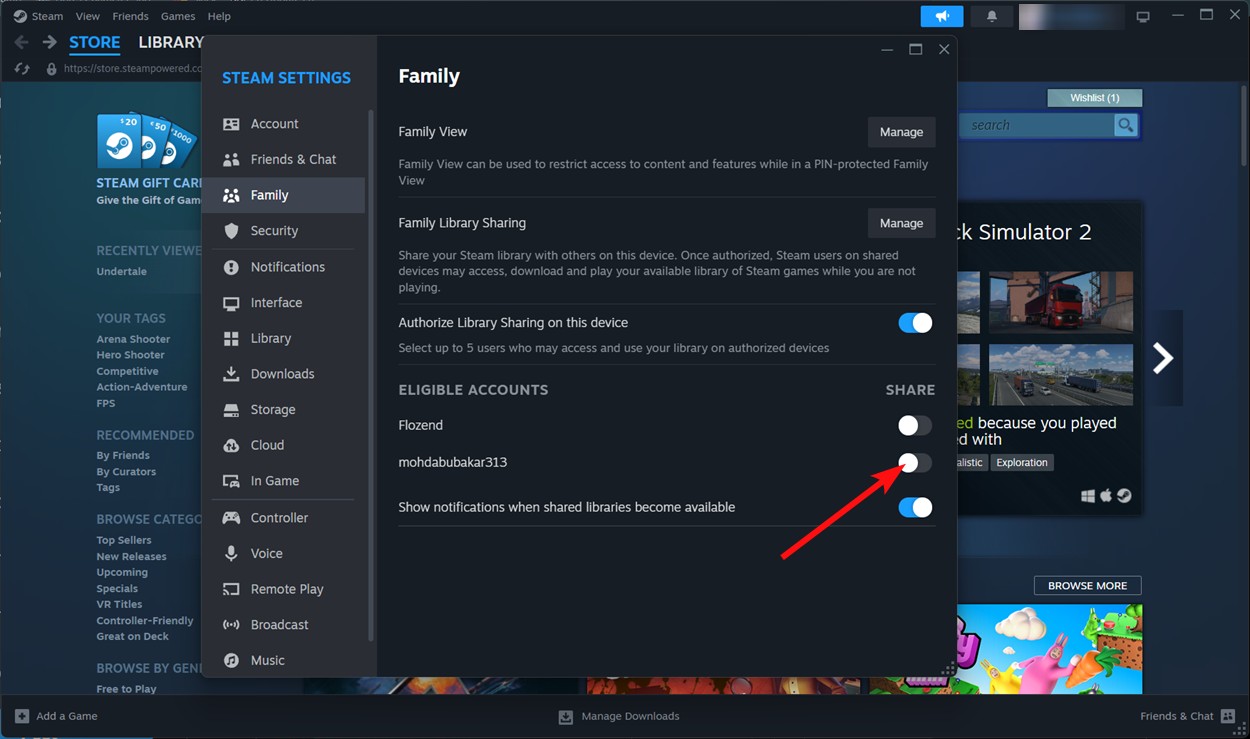
- Step 2: Authorize Devices. Log into your Steam account on the computer that your family member or friend will use. Once logged in, go to Steam > Settings > Family & Sharing. Check the box for "Authorize Library Sharing on this computer."
- Step 3: Add Family Accounts. While still in the Family & Sharing settings on the authorized computer, you should see a list of accounts that have logged into Steam on that machine. Select the specific accounts you wish to grant access to your library. Each user will then see your shared games in their library as if they owned them, with a small icon indicating they are borrowed.
Remember, you can authorize up to 10 devices and 5 family members/friends to share your library. This process is secure and designed to give you full control over who accesses your games and on which machines.
What Are the Key Limitations of Sharing Steam Games?
While Steam Family Sharing is incredibly useful, it comes with important limitations that every gamer should understand to avoid frustration. The biggest one revolves around simultaneous play. If the owner of the shared library starts playing any game from their library, the borrower will receive a notice and typically has a few minutes to either purchase the game or quit playing. This means only one person can be actively using a game from the shared library at any given time. Additionally, not all games are eligible for sharing; titles that require a third-party key, account, or subscription, or certain DRM-protected games, often cannot be shared. Also, while the borrower gets access to all DLC for a shared game, they cannot selectively borrow DLC if they own the base game themselves. Regional restrictions can also apply, meaning a game available in one region might not be playable if the borrower is in another.
Can I Play Games Simultaneously with a Shared Library?
The short answer is generally no, you cannot play games simultaneously from a single shared Steam library. If the owner of the library (the 'lender') starts playing any game from their collection, whether it's a shared title or not, any borrower currently playing a game from that shared library will receive a notification and will usually have a 5-minute grace period to either purchase the game or exit. This rule ensures that the primary account holder always has priority access to their own library. However, there's a small but significant exception: if the borrower is playing an entirely different game than the owner, and neither game is actively being played by the owner, then they might be able to play. But as soon as the owner launches *any* game, the borrower's session will be interrupted. For true simultaneous play, separate copies of games are typically required, or you might explore games with built-in local co-op on a single machine.
What Happens to DLC and In-Game Purchases When Sharing?
When you share a game via Steam Family Sharing, the borrower gains access to all your downloadable content (DLC) for that specific game. This is great news for those who have invested heavily in expansions and cosmetic packs. However, there's a catch: they cannot purchase DLC for a borrowed game and apply it to your library, nor can they purchase DLC if they already own the base game themselves and are trying to access your DLC separately. In-game purchases, such as microtransactions or items bought within the game, are tied to the individual account that made the purchase and are generally not shared. This means if your friend is playing a game from your library and buys some in-game currency, those items will belong to their account, not yours. It is important to remember that any infractions or bans incurred while playing a borrowed game, particularly those related to cheating, will reflect on the *owner's* account, not just the borrower's.
Are There Any Alternatives to Steam Family Sharing for PC Gamers?
While Steam Family Sharing is the primary method for lending games on the platform, other options exist for sharing gaming experiences, especially in a household. For PC gamers, local co-op games are a fantastic alternative, allowing two or more players to enjoy a game on a single PC using multiple controllers or keyboard/mouse setups. Services like Parsec or Steam's Remote Play Together enable online co-op for local multiplayer games, effectively allowing you to share a screen and play together from different locations. Beyond Steam, other digital storefronts like GOG.com (with its DRM-free policy) or Epic Games Store (which sometimes offers its own sharing features or allows more flexible installation) might present different sharing opportunities depending on their terms. For console gamers, features like PlayStation's Console Sharing and Offline Play or Xbox's Home Xbox setting provide similar library sharing capabilities. Always check the specific platform and game's terms of service.
How Can I Troubleshoot Common Steam Family Sharing Issues?
Even with a straightforward system, you might encounter a few hiccups when trying to share your Steam library. Here are some common issues and their quick fixes:
- Game Not Appearing in Borrower's Library: Ensure the computer is authorized and the correct user account is selected in your Family & Sharing settings. Also, double-check that the game isn't one of the excluded titles (e.g., requiring a third-party account).
- "Library in Use" Message: This is the most common issue. It means the owner (you) is playing a game from their library. You'll need to exit your game for the borrower to continue playing.
- Authorization Issues: Sometimes, a computer might lose its authorization. Simply log into your account on that PC, go to Settings > Family & Sharing, and re-authorize the device and the specific user account.
- Region Locks: If a game is region-locked, or a borrower travels to a region where the game is unavailable, it won't be playable. There's no workaround for this through Family Sharing.
- Performance Problems: The quality of the shared game experience can sometimes depend on the borrower's PC specs. Ensure their system meets the game's minimum requirements for optimal play.
A good first step for any issue is to restart both Steam clients and re-check all authorization settings. Many problems resolve with a simple refresh.
Is It Safe to Share My Steam Account Information?
No, it is generally NOT safe to share your direct Steam account login information (username and password) with anyone, even trusted family or friends. Steam Family Sharing is designed specifically to allow others to access your games *without* needing your account credentials. Sharing your login details puts your entire account at risk, including your payment information, personal data, and all your games. If someone misuses your account, engages in cheating, or gets it compromised, you will bear the consequences. Always use the official Family Sharing feature, which protects your account while granting access to your library. Think of it like lending a book instead of giving someone the keys to your entire house. Your account security should always be a top priority for adult gamers who have invested significantly in their digital libraries and online presence.
How Does Sharing Align with Modern Gaming Trends for Busy Adults?
For the average US gamer around 36 years old, who balances work, family, and life, gaming isn't just a pastime; it's a valuable outlet for relaxation, skill-building, and social connection. Sharing Steam games aligns perfectly with these realities in 2026. It offers significant value for money, allowing households to maximize entertainment from existing purchases. It fosters social play, enabling family members or close friends to try out cooperative or social games trending this month, like Palworld or Helldivers 2, without multiple purchases. This feature supports a budget-friendly approach to staying current with gaming trends, especially given the rising costs of living and hardware upgrades. It addresses the pain point of limited time by making games more accessible to loved ones, reducing the friction of entry and encouraging shared experiences. In an era where mobile gaming dominates daily casual play, but PC gaming still offers deep, immersive experiences, Family Sharing helps bridge the gap, making PC gaming more communal and integrated into busy lifestyles.
FAQ Section
Can I share a game that requires a third-party launcher?
Generally, no. Games that require a separate launcher, account, or subscription (like an EA Play title or an MMO) typically cannot be shared through Steam Family Sharing due to their external verification systems.
Will a borrower get their own achievements and save data?
Yes, when a borrower plays a game from your shared library, they use their own Steam account, earn their own achievements, and all game progress and save data are stored on their account. This ensures a personalized gaming experience for each user.
What if I want to revoke sharing access from someone?
You can easily revoke access at any time. Simply go to Steam > Settings > Family & Sharing, and you can de-authorize specific computers or individual user accounts from sharing your library. This gives you full control over who has access.
Can shared games be played offline?
Yes, if the borrower has previously downloaded and launched the game while online, they can play shared games in Steam's Offline Mode, provided the owner is not currently playing any game from their library and the game itself supports offline play.
Are there any risks to my account when using Family Sharing?
The primary risk is that if a borrower cheats or engages in illicit activities while playing a game from your shared library, your account (as the owner) may receive a VAC ban or other penalties. Always share with trusted individuals who respect the rules.
Does Steam Family Sharing include my entire game library?
Most games are shareable, but not all. Titles with specific DRM, requiring third-party accounts, or those with region restrictions are often excluded. You'll see which games are shareable when you authorize a device and user.
Can I share my Steam account with someone who lives in a different country?
While technically possible to authorize a computer in another country, be aware of potential region locks on certain games. If a game is not available for purchase or play in the borrower's region, it won't be playable even if shared.
Conclusion
For the modern gamer, navigating the vast digital landscape of Steam games can be both exciting and, at times, expensive. Steam Family Sharing offers a brilliant solution, allowing you to extend the joy of your game library to trusted family and friends without duplicating purchases. It's a testament to Steam's commitment to creating a connected gaming ecosystem. By understanding its simple setup, respecting its limitations regarding simultaneous play, and staying vigilant about account security, you can effortlessly share your passion and your pixels. This feature empowers busy adults to maximize their entertainment budget, foster social connections through gaming, and introduce loved ones to their favorite virtual worlds. So go ahead, authorize that PC, invite your family, and make your gaming experiences truly shared. What's your biggest gaming challenge when it comes to sharing games? Comment below!
Steam Family Sharing allows sharing games with up to 5 accounts on 10 devices. Simultaneous play is generally restricted to one user per shared library. Not all games are eligible for sharing, especially those requiring third-party keys or subscriptions. DLC cannot be selectively shared; the borrower gets access to all DLC if the base game is shared. Sharing is ideal for family members and trusted friends to try games or play when the owner is offline. Account security is paramount when enabling sharing features.
35

How Can You Share Steam Games With Your Friends Easily Hero . How Can You Share Steam Games With Your Friends Easily . How Can You Share Steam Games With Your Friends Easily . Steam March 2026 Client Update Adds Hardware Specs To User Reviews Steam Client Mar 2026 . How To Share Games Using Steam Family Sharing Beebom Share Library




Steam Family Sharing How To Share Games On PC Webp. How Can You Share Steam Games With Your Friends Easily Steam Share Games . Steam Next Fest February 2026 The 22 Best Game Demos The Best Steam Next Fest Demos 2026 The Punished Backlog Order 2 300x162 . Ventas De Steam 2026 Calendario Fecha Completa Y Las Mejores Ofertas All Steam Events 2026. How Can You Share Steam Games With Your Friends Easily



5 Game Steam Yang Patut Kamu Mainkan Di Bulan Januari 2026 . January 2026 S Top Selling New Steam Games Revealed 08418405 04a2 47eb B48b 1500x843 . Steam Reveals Full 2026 Schedule For Fests And Seasonal Sales GamerBraves Steam Sale Fest Schedule Article Image 1 . 17 Game Gratis Di Steam 2026 Seru Bikin Kamu Ketagihan Jurnal Ngawi 3471022749 . New Steam Features For 2026 Steam Features 2026 What S New Banner.webp



Jadwal Lengkap Steam Sale 2026 Catat Tanggal Diskon Game Favoritmu Game Di Steam . The Best Selling Paid Games On Steam Right Now Cheat Code Central Most Played Games Steam 2026 2048x1167 . Best Free Games To Claim Right Now 2026 Steam PlayStation Xbox More May 2026 Free Games Feature Image . Steam Launches 2026 By Giving Players Four Free Games August 5 2021 Brazil. In This Photo The Steam. Steam Reveals Full 2026 Schedule For Fests And Seasonal Sales GamerBraves Steam Sale Fest Schedule News FI 750x392

Best Co Op Survival Horror Games On Steam 2026 Update LRDev Games 1.Best RPG Games On Steam Complete Guide.webp. Valve Has Revealed All Steam Sale Event Dates For 2026 Steam Tererowa Game Rant . Valve Confirms Every Steam Sale Coming Our Way In 2026 2025 Steam Winter Sale Best Deals . The Top 50 Most Played Demos On Steam Next Fest February 2026 Edition Image13 . Rekomendasi Game Steam Spring Sale 2026 Wajib Beli Steam Awards 2025 Winners 1024x576





2026 N N Steam Ndirim Tarihleri Belli Oldu Tamindir Steam 2026 Indirim Takvimi . Steam Sales 2026 Here S The Schedule For The First Half Of The Year 1824cr953 . All The Free Games You Can Claim In May 2026 All The Free Games You Can Claim In April 2026 New Image . Kalender Lengkap Event Steam 2026 Diskon Besar Dan Festival Game Favorit Steam Events Q82 W2560 H 27565.webp. Steam Starts 2026 With 4 New FREE Games No Strings Attached Steam Logo In Forest

:quality(30):format(webp):focal(0.5x0.5:0.5x0.5)/jogja/foto/bank/originals/20260423-Steam-Weekend-Deal-April-2026.jpg)
:strip_icc():watermark(kly-media-production/assets/images/watermarks/liputan6/watermark-color-landscape-new.png,1180,20,0)/kly-media-production/medias/5535685/original/040139800_1774087096-Steam_Spring_Sale_2026_01.jpeg)


How Can You Share Steam Games With Your Friends Easily . Midweek Deal Steam April 2026 Hadir Dengan Berbagai Game Mabar Menarik 20260423 Steam Weekend Deal April 2026 . Steam Spring Sale 2026 Dimulai Banyak Game PC Dan DLC Dipangkas Harga 040139800 1774087096 Steam Spring Sale 2026 01 . Can You Play Steam Games On Xbox Consoles Pexels Photo . Steam Survey For February 2026 Shows A Big Swing To Simplified Chinese Steamos 2025